Building a 60fps Spatial Canvas from Scratch: Frustum Smoothing & Offline-First Collaboration
Building a 60fps Spatial Canvas from Scratch: Frustum Smoothing & Offline-First Collaboration
In modern cloud-native microservices, real-time data lakes, and high-concurrency distributed architectures, architects and lead engineers daily design massive 4K topology maps spanning hundreds of microservice nodes, message queues, and storage clusters.
However, when presenting these architectural blueprints during technical reviews, design defenses, or developer summits, traditional presentation mediums fall short:
- Cognitive Overload: Projecting an entire 4K topology onto a screen bombards the audience with hundreds of nodes and tangled connections, causing information fatigue within 30 seconds.
- Context Fragmentation: Chopping the master diagram into a 15-slide deck severs the systemic topology and trace context—audiences see the trees but lose the forest.
- Static Video Limitations: Recorded screen captures add dynamic motion but sacrifice interactivity—viewers cannot pause to inspect specific container configurations or endpoint params.
- Prohibitive Production Costs: Keyframing camera flights in After Effects means any single architectural update invalidates the entire animation project.
To solve this dilemma at its core, we built the FocusFlow spatial presentation engine from the ground up. This article explores how we leveraged pure TypeScript, kinematic motion models, and the browser GPU compositor thread to build a silky 60fps, anti-dizziness, 100% offline-first infinite spatial canvas.
1. Spatial Frustum & Infinite Canvas Philosophy: Lessons from Prezi and Miro
When designing the spatial canvas, we deeply analyzed the pioneer of nonlinear zooming presentation software, Prezi, and the industry benchmark for infinite whiteboards, Miro:
- Prezi's ZUI (Zooming User Interface) and the "Forest & Trees" Mental Model: Human cognition naturally anchors memory in spatial orientation. In the global view, audiences grasp the overarching architecture; as technical discussion deepens, the camera zooms into specific microservice cards; upon concluding, the camera zooms out to regain context before panning smoothly to the next subsystem. This spatial continuum provides profound immersion and logical cohesion.
- Miro's Lightweight Frame Navigation: Framing arbitrary areas on the canvas to define key slides dramatically lowers the barrier to creating spatial decks.
graph LR
    A["Starting Scene 1<br/>Zoom: 2.5x"] -->|"1. Lift-off Phase<br/>Zoom: 1.2x (Ascend & Decelerate)"| B["Apex Cruising<br/>Macro Overview + Rapid Translation"]
    B -->|"2. Touchdown Phase<br/>Translate Deceleration + Zoom In"| C["Target Scene 2<br/>Zoom: 3.0x"]
However, Prezi also provided a cautionary tale—"Prezi Motion Sickness": early versions permitted arbitrary camera roll () coupled with aggressive, wide-range zooms, triggering severe conflicts between the inner ear vestibular system and visual ocular signals.
FocusFlow's Architectural Hard-Line was set: strictly reject extreme roll angles, embrace 2.5D affine projection with disciplined kinematics, and permanently lock camera rotation within comfortable thresholds.
2. Core Mathematical Model: Parabolic W-Curve Transition Dynamics
When two scenes span large spatial distances at high magnification (e.g., transitioning from a close-up in the top-left corner to a close-up in the bottom-right corner), standard single-bezier easing drives the camera "low across the terrain." Irrelevant elements rush past at blinding speeds, inducing intense visual strobing and motion blur.
Drawing from information visualization theory (Van Wijk & Nuij Model), we re-architected our flight interpolation pipeline:
2.1 Euclidean Distance & Adaptive Activation
We first calculate the spatial Euclidean distance between scenes:
- When (short-distance reframing): execute gentle linear/bezier camera panning;
- When (long-range traverse): automatically activate the Parabolic Zoom-Out Arc (W-Curve).
2.2 Apex Zoom Altitude Formulation
2.3 Adaptive Flight Duration Dynamics
Rejecting rigid, one-size-fits-all transition durations, flight timing adapts dynamically to spatial displacement and zoom ratios:
The flight pipeline enforces three disciplined phases:
- Lift-Off (0% – 30%): Camera ascends swiftly to , granting viewers immediate macro orientation;
- Cruising (30% – 70%): Primary spatial translation executes at low magnification, reducing on-screen linear pixel velocity by 60% and eliminating visual ghosting;
- Touchdown (70% – 100%): Lateral translation gently decelerates into the target station, pushing in smoothly to close-up zoom .
3. 2.5D Drone Gimbal Micro-Pitching & GPU Compositor Synthesis
When physical aerial drones bank and zoom, the chassis exhibits subtle aerodynamic tilting and gimbal pitch. We integrated a disciplined micro-kinematic model into the spatial engine:
- Accelerating rightwards rolls the canvas clockwise by ; leftward movement does the reverse;
- Maximum roll angle is strictly hard-clamped within , delivering thrilling cinematic depth while keeping the vestibular system well within its comfort zone.
// FocusFlow Camera 60fps GPU Compositing Transform
export function computeCameraMatrix(
  x: number,
  y: number,
  zoom: number,
  rollDeg: number,
  pitchDeg: number
): string {
  // Pure 3D Hardware-Accelerated Matrix
  return `perspective(1400px) translate3d(<span class="katex"><span class="katex-mathml"><math xmlns="http://www.w3.org/1998/Math/MathML"><semantics><mrow><mrow><mo>−</mo><mi>x</mi></mrow><mi>p</mi><mi>x</mi><mo separator="true">,</mo></mrow><annotation encoding="application/x-tex">{-x}px,</annotation></semantics></math></span><span class="katex-html" aria-hidden="true"><span class="katex-base"><span class="katex-strut" style="height:0.7778em;vertical-align:-0.1944em;"></span><span class="mord"><span class="mord">−</span><span class="mord mathnormal">x</span></span><span class="mord mathnormal">p</span><span class="mord mathnormal">x</span><span class="mpunct">,</span></span></span></span>{-y}px, 0) scale(<span class="katex"><span class="katex-mathml"><math xmlns="http://www.w3.org/1998/Math/MathML"><semantics><mrow><mrow><mi>z</mi><mi>o</mi><mi>o</mi><mi>m</mi></mrow><mo stretchy="false">)</mo><mi>r</mi><mi>o</mi><mi>t</mi><mi>a</mi><mi>t</mi><mi>e</mi><mi>X</mi><mo stretchy="false">(</mo></mrow><annotation encoding="application/x-tex">{zoom}) rotateX(</annotation></semantics></math></span><span class="katex-html" aria-hidden="true"><span class="katex-base"><span class="katex-strut" style="height:1em;vertical-align:-0.25em;"></span><span class="mord"><span class="mord mathnormal" style="margin-right:0.044em;">z</span><span class="mord mathnormal">oo</span><span class="mord mathnormal">m</span></span><span class="mclose">)</span><span class="mord mathnormal" style="margin-right:0.0278em;">r</span><span class="mord mathnormal">o</span><span class="mord mathnormal">t</span><span class="mord mathnormal">a</span><span class="mord mathnormal">t</span><span class="mord mathnormal">e</span><span class="mord mathnormal" style="margin-right:0.0785em;">X</span><span class="mopen">(</span></span></span></span>{pitchDeg}deg) rotateZ(${rollDeg}deg)`;
}
By offloading CSS 3D affine matrix transformations directly to the browser GPU Compositor thread, the engine achieves Zero Reflow and Zero Main-Thread Blocking, sustaining 60fps even across thousands of active diagram elements.
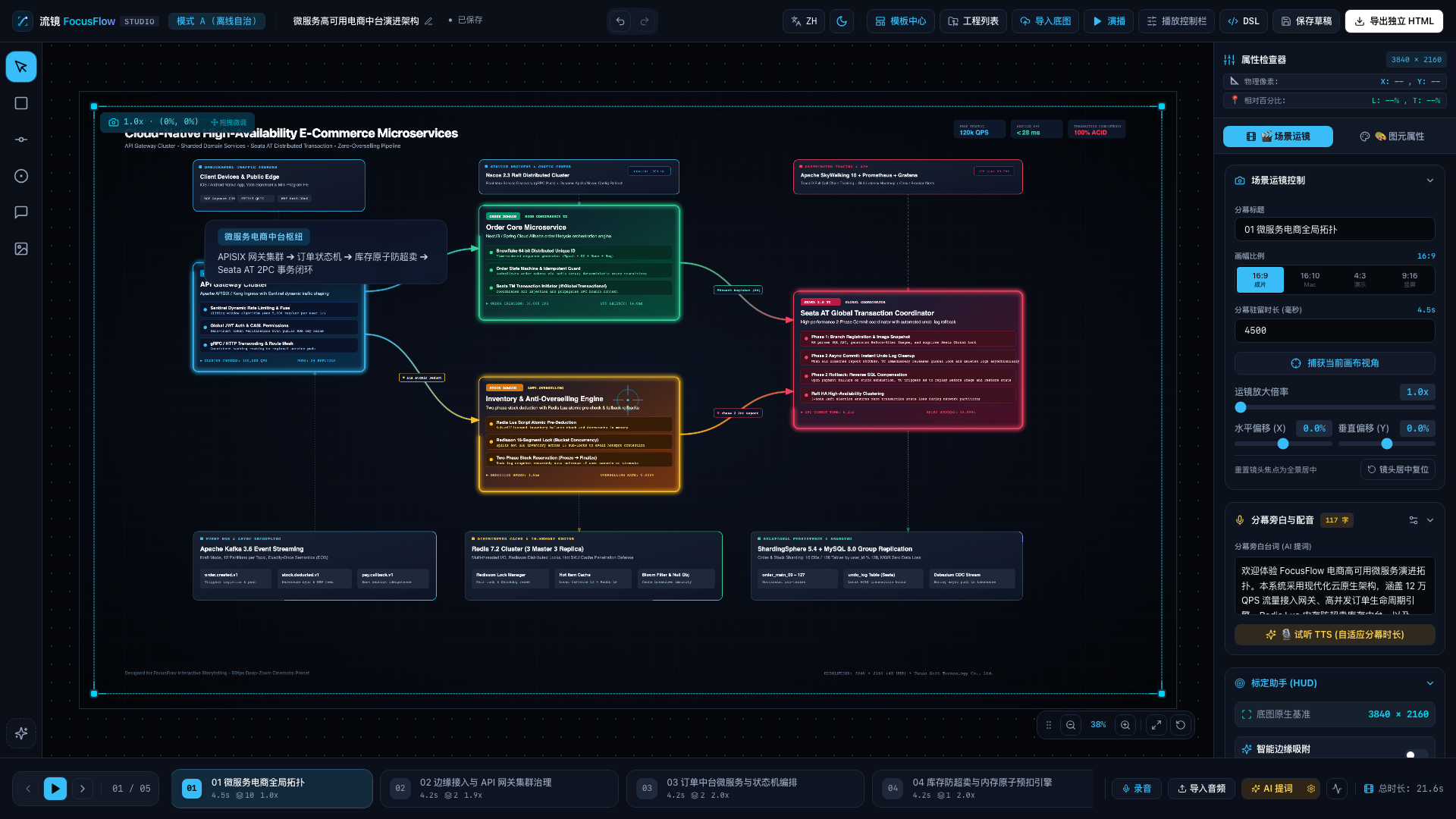
FocusFlow Studio Workbench
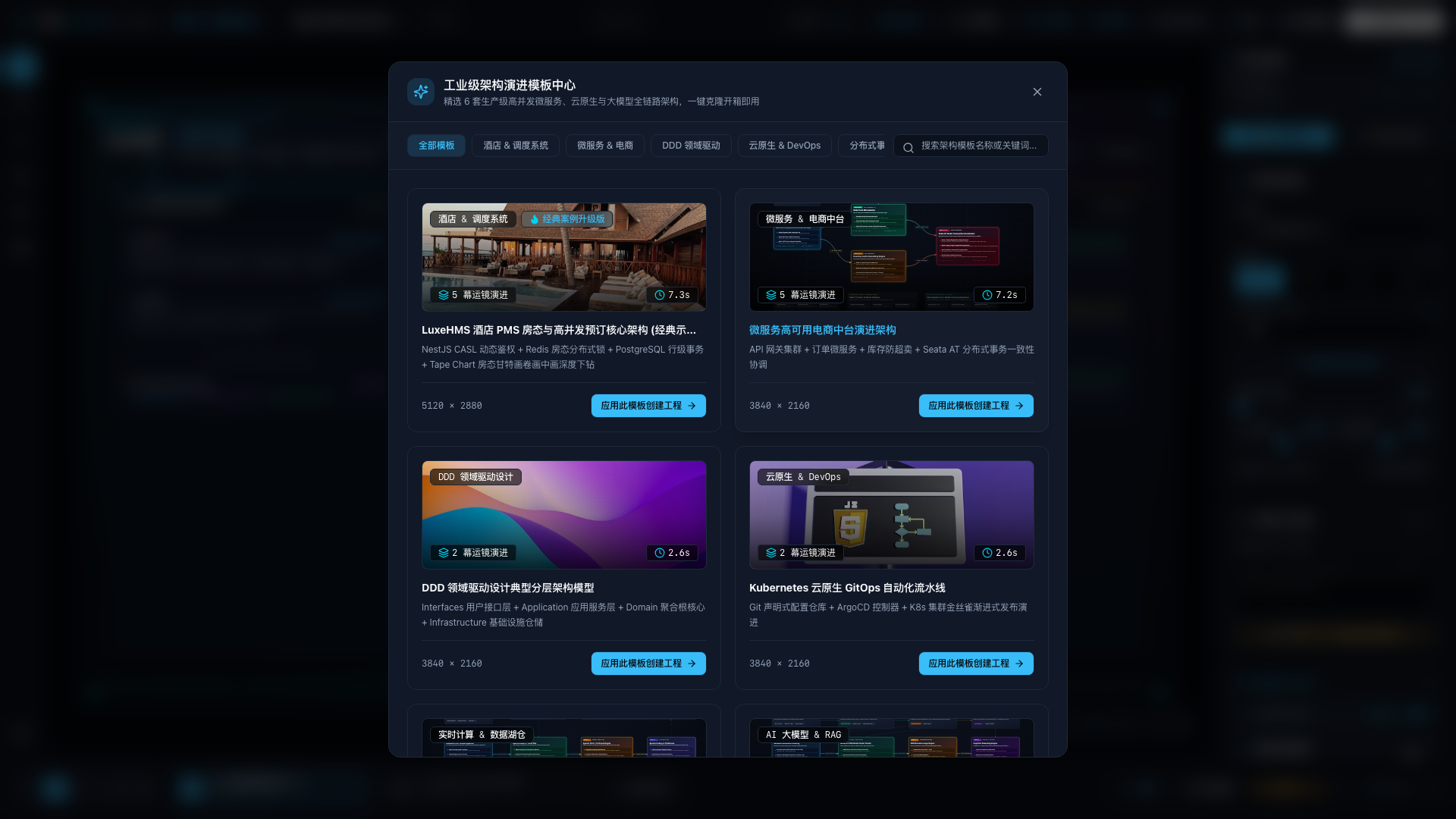
Microservices 4K Architecture Template
4. Dynamic Glowing Bezier Pulse Flows & Smart Routing
Static topology diagrams rely on rigid solid lines that fail to communicate dynamic traffic flows. FocusFlow renders animated microservice pulse streams at the SVG layer:
- Adaptive Anchor Snapping: Dynamically computes optimal ingress/egress anchor ports based on the relative spatial orientation between source and destination cards.
- Cubic Bezier Smoothing: Automatically offsets control points:
- Glowing Pulse Shaders: Combining SVG
stroke-dashoffsetanimations with Gaussian blur glow filters to mirror the real-time throughput of asynchronous message queues (Kafka/RabbitMQ).
5. 100% Local-First Architecture & Standalone Offline Distribution
In confidential cloud infrastructures, core banking systems, and medical workflows, data privacy is non-negotiable.
FocusFlow breaks free from the multi-tenant cloud storage mandate of conventional SaaS whiteboards:
- Offline Single-File Compiler: Inlines 4K bitmaps, animated pulse flows, narration audio, and camera scripts into a single, self-contained
< 5MBstatic.htmlfile via Base64; - Air-Gapped Portability: Deliver decks via AirDrop or USB drive; double-clicking in any modern browser launches the presentation with full 60fps playback without requiring an internet connection;
- Client-Side 60fps Video Export: An integrated hardware-accelerated MediaStream pipeline encodes broadcast-grade 60fps MP4/WebM videos locally in the browser without remote cloud rendering costs.
6. Conclusion & Open Source Ecosystem
From static 4K master diagrams to 60fps cinematic spatial narratives, FocusFlow proves the immense power of modern pure frontend Web technologies in advanced computer graphics, kinematics, and local-first architecture.
- Live Demo: https://focusflow.tumio.site/
- GitHub Repository: https://github.com/tumio-ltd/focusflow
Experience 60fps Cinematic Motion on the Web
Transform your complex software architectures and workflows into silky 60fps narratives. 100% local-first data privacy.