MD-Vault Architecture: Zero-Dependency Local-First 2FA Password Vault for Markdown Geeks
MD-Vault Architecture: Zero-Dependency Local-First 2FA Password Vault for Markdown Geeks
For a long time, I was accustomed to recording everyday accounts and passwords directly in simple text files—it was frictionless, transparent, and completely free from proprietary software lock-in.
However, as credentials multiplied, searching through them became a tedious chore; even worse, accidental keystrokes while copying occasionally altered or deleted characters, leading to frustrating login failures down the road.
To solve this real everyday friction, I had AI help me build a lightweight, local password manager—the humble origin of MD-Vault. As it evolved, we bridged plain text with an intuitive card dashboard, one-click copy protections against accidental edits, and native client-side 2FA/TOTP calculation powered by the WebCrypto API.
1. Core Design: Viewing Local Markdown via a Single-File HTML
The issue with many password tools is that once you adopt them, your data gets locked inside a proprietary database. MD-Vault adheres to a simple principle: complete separation of code and data.
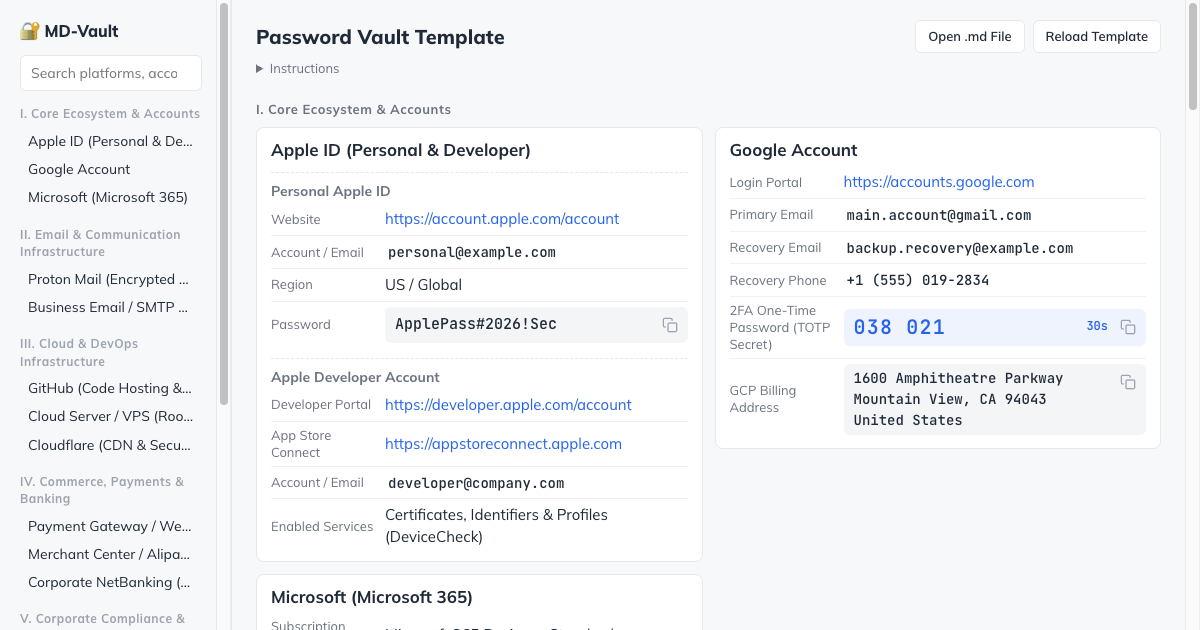
- Passwords remain in your own Markdown files:
Your actual accounts, passwords, and recovery codes stay in a plain
.mdfile on your local disk. You can open, read, or edit it anytime with any text editor (VS Code, Obsidian, Vim, or system notepad), free from proprietary format lock-in. - Loaded and viewed via
index.html:index.htmlis merely an empty, standalone static page under 30KB that contains no user credentials. Everyday usage is straightforward:- Open
index.htmlin any modern web browser; - Click the file selector in the top-right corner, or drag and drop your
.mdfile directly onto the window; - The browser instantly parses the file in local memory and renders a clean, responsive card dashboard.
- Open
- 100% local with zero network calls: All parsing, search filtering, and one-click copy protections happen entirely within your browser's local memory. There is no backend server and zero external network requests. Even completely offline, everything works without interruption.
2. Dynamic Verification: Computing TOTP in Browser via WebCrypto
Another friction when managing passwords in text files is two-factor authentication (2FA/TOTP): whenever a site asks for a verification code, you have to break your flow, pull out your phone, and open an authenticator app.
Since modern browsers provide the native WebCrypto API, the page can calculate valid verification codes locally on the fly using the shared secret and timestamp.
In the Markdown file, you simply write down the secret using the standard format:
- **GitHub**:
  - username: `[email protected]`
  - password: `my-super-secret-pass`
  - otpauth: `otpauth://totp/GitHub:octocat?secret=JBSWY3DPEHPK3PXP&issuer=GitHub`
2.1 Time Stepping and HMAC-SHA1 Computational Model
The mathematical core of TOTP (RFC 6238) calculates the current 30-second time step from the Unix epoch:
This step counter is encoded into an 8-byte big-endian buffer and hashed against the decoded Base32 secret using HMAC-SHA1:
2.2 Dynamic Truncation & 6-Digit Extraction
From the resulting 20-byte HMAC hash, the low-order 4 bits of the final byte determine the dynamic byte offset:
Extracting 4 contiguous bytes starting from this offset, masking out the sign bit, and taking modulo :
The browser implementation is remarkably concise:
// WebCrypto Native TOTP Generator
export async function generateTotp(secretBase32: string): Promise<{ code: string; remainingSeconds: number }> {
  const epoch = Math.floor(Date.now() / 1000);
  const timeStep = Math.floor(epoch / 30);
  const remainingSeconds = 30 - (epoch % 30);

  const keyBuffer = base32ToBuffer(secretBase32);
  const cryptoKey = await window.crypto.subtle.importKey(
    'raw',
    keyBuffer,
    { name: 'HMAC', hash: { name: 'SHA-1' } },
    false,
    ['sign']
  );

  const timeBuffer = new ArrayBuffer(8);
  const dataView = new DataView(timeBuffer);
  dataView.setUint32(4, timeStep, false);

  const hmacSignature = await window.crypto.subtle.sign('HMAC', cryptoKey, timeBuffer);
  const hash = new Uint8Array(hmacSignature);

  const offset = hash[hash.length - 1] & 0x0f;
  const binary =
    ((hash[offset] & 0x7f) << 24) |
    ((hash[offset + 1] & 0xff) << 16) |
    ((hash[offset + 2] & 0xff) << 8) |
    (hash[offset + 3] & 0xff);

  const otp = binary % 1000000;
  return {
    code: otp.toString().padStart(6, '0'),
    remainingSeconds
  };
}
The frontend refreshes the countdown every second, turning warning colors when under 5 seconds, allowing you to copy the current code with one click.
3. Local Security & Practical Usage Guidelines
To ensure everyday use is both comfortable and secure, MD-Vault adheres to several simple principles:
- Zero External Network Requests: All styling, icons, and logic are contained within a single HTML file without third-party CDNs, tracking scripts, or remote fonts, operating completely offline;
- Pairs Naturally with System Encryption: Because credentials remain in plain Markdown, anyone with disk security concerns can place the file inside a BitLocker or FileVault volume, an encrypted disk image, or transparently encrypt it with
git-crypt; - Pure Local Open Source: MD-Vault is a completely free, lightweight tool. Your data stays entirely in your hands, free from accounts or cloud synchronization requirements.
4. Ideas for the Future (AI Suggestions Pool)
After finishing the current lightweight prototype, the AI assistant thoughtfully brainstormed an interesting list of potential enhancements. To keep version 1.0 minimal and focused, they were set aside for now, but I saved them in the project roadmap to explore when needed:
- Shoulder-Surfing Privacy Mode: An optional blur filter over passwords for shared office or screen-sharing environments, revealing text only on hover while keeping one-click copying intact;
- Clipboard Auto-Clear: Automatically clearing the clipboard after a 30-second countdown to prevent credentials from lingering in system clipboard history;
- In-Page Editing & File System Access: Leveraging the browser's
File System Access APIto add or edit accounts directly from the UI and write changes back to the local.mdfile; - At-Rest Encrypted Vaults: Using WebCrypto's
AES-GCMwith a master password prompt to decrypt and render files entirely in memory, leaving only ciphertext on disk; - Launcher & CLI Integration: Lightweight scripts for terminal or Raycast/Alfred plugins that parse the same Markdown file to fetch 2FA verification codes via simple keyboard shortcuts.
5. Live Demo & GitHub Repository
- Live Demo (GitHub Pages): https://xiangc579.github.io/md-vault/
- GitHub Repository: https://github.com/xiangc579/md-vault
Zero-Dependency Local-First 2FA Vault
Fatigued with central password database breaches? Experience high-density plain-text credentials with native WebCrypto TOTP computation.